
Home > Login
Mega888 Login Guide - Player App vs Kiosk
Not sure which one you need? Read the guide below.
Player App Login and Kiosk Login
Players normally enter their ID and password inside the installed Mega888 app. A Kiosk login is a separate browser-based panel used for account administration.
Do not enter a player password into an unfamiliar webpage. If a link claims to offer browser play, verify it with the support route that issued your account before entering any details.
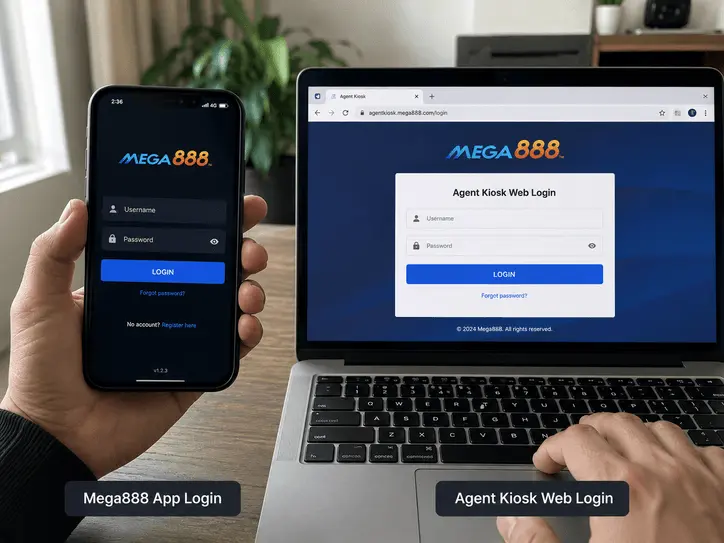
Player Login
Open the installed Android or iOS app and enter the ID supplied for your account.
- Where to login: Inside the Android APK or iOS App.
- Your ID: Use the letters, numbers and punctuation exactly as supplied.
- First login: If you receive a temporary password, change it when the app prompts you and store the new password privately.
Agent Kiosk Login
Agents may use a separate browser-based Kiosk panel. It is not the same screen as the player app.
- Where to log in: Use only the private address supplied through your established account route.
- If the address fails: Do not search for a replacement Kiosk page and enter credentials at random. Ask the same account contact to confirm the current address.
Fix Common Mega888 Login Errors
If you are stuck at the login screen, check these common causes before assuming the account has been compromised.
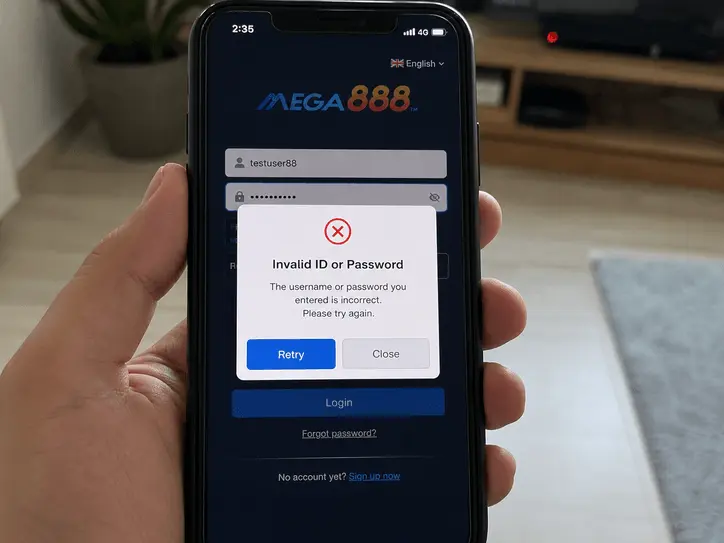
"Invalid ID or Password"
Check the username and password carefully before requesting a reset.
- Extra spaces: Copying from a message can add a space before or after the password. Type it manually once.
- Capital letters: Passwords may be case-sensitive, so match the original format.
"Account Suspended" or "ID Blocked"
This is an account-specific restriction, not an installation error. Stop repeated login attempts and contact the route that created the ID. Share the username and exact on-screen message, but not the password, OTP or PIN.
"Server Maintenance" Message
Do not change your password or reinstall immediately. Close the app and use the maintenance checks to compare the app message, connection and installed version.
Need an Account?
Read how account setup works or use a shared Test ID to inspect the app first.