
Home > Mega APK
Mega888 APK Download for Android - Mega888Client.com Guide

Android Setup at a Glance
| App Name | Mega888 (Mega APK) |
|---|---|
| File Type | Android APK |
| Install Method | Browser download and manual install |
| Permission | Allow installs from the browser you use |
| Common Devices | Samsung, Xiaomi, Vivo, Oppo, Huawei |
Install the Mega888 APK on Android
This guide covers the official Android installation for the Mega888 Client in Malaysia. Because the app is installed via direct APK rather than Google Play Store, Android requires granting installation permission to your browser. Follow our step-by-step guide below to install safely, configure permissions on Samsung, Xiaomi, or Huawei, and avoid modified or untrusted APK packages.
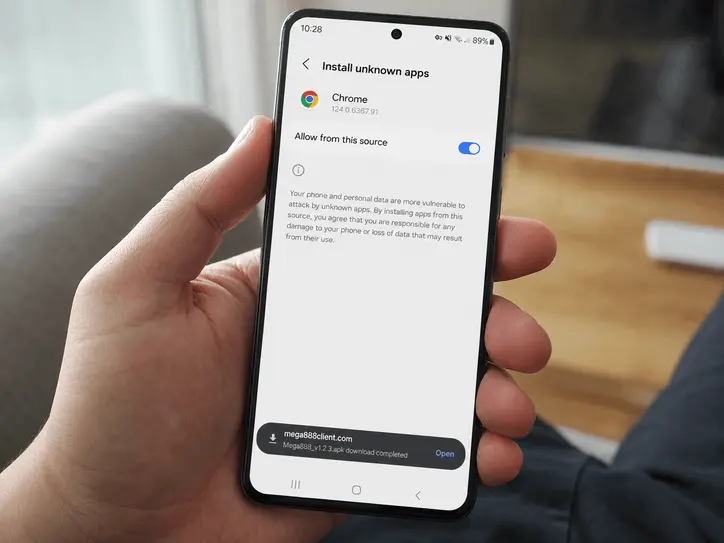
Step 1: Allow "Unknown Sources"
Android blocks apps downloaded outside Google Play until you allow the browser or file manager to install them. Grant the permission only to the app you are using for this download.
- Open your phone's Settings and tap on Security (or Biometrics and Security depending on your phone).
- Scroll down until you see "Install Unknown Apps" or "Unknown Sources".
- Find your browser (like Chrome) in the list and toggle the switch to ON.
Step 2: Download the Mega APK
Use the Download Mega APK button above. Once the download finishes, open the notification or file manager, tap the APK file, and choose Install when Android shows the prompt.
Mega888 APK Installation Errors
Error: "App Not Installed"
This message often points to an older installation, an incomplete download or insufficient storage.
- Older version still installed: If Android cannot replace the existing package, save any details you need, uninstall the old app, then open the newly downloaded APK again.
- Not enough storage: Check the storage section in your phone settings and make some space before retrying.
Error: "Parse Error" (There was a problem parsing the package)
A parse error can appear when the download is incomplete or the APK is not compatible with the Android version on the phone.
- Delete the failed file and download it again on a stable connection.
- If the error remains, check your Android version and contact support with the phone model and exact message.
Brand-Specific Setup Guides
For Samsung Users
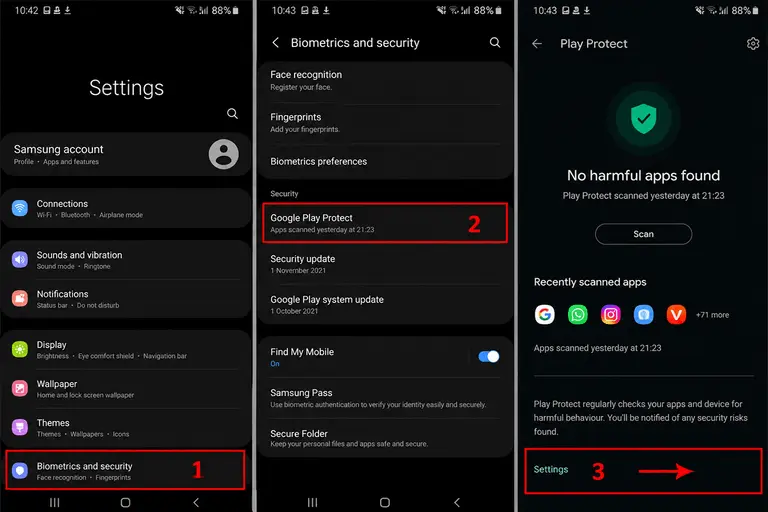
Samsung devices include Google Play Protect, which may warn you before installing an APK outside the Play Store. If the warning appears, pause and confirm that you are using the intended Mega888Client.com route before continuing.
- Open the Google Play Store app.
- Tap your profile icon in the top right corner.
- Select Play Protect and review any warning shown for the downloaded file.
- If you choose to continue, only allow the current install and turn normal security scanning back on after setup.
For Huawei (HarmonyOS) Users
Huawei devices without Google Services can still install APK files through the browser or file manager. If HarmonyOS shows an extra security prompt, read it carefully and only continue when you recognize the source and file name.
For Xiaomi, Redmi & Poco (MIUI/HyperOS)
Xiaomi phones sometimes show an extra MIUI or HyperOS scan before the install button appears. Wait for the scan to finish and check the app name, file size, and source before you proceed.
After Installation
Open the app and use your existing ID. To inspect the interface without using a personal account, see the shared Test ID guide.